

1. Introduction
What Is a Signed URL Laravel?
A signed URL Laravel is a special type of URL that contains a cryptographic signature appended to it as a query parameter. This signature ensures that the URL has not been modified since it was generated. Laravel verifies this signature on every request, allowing access only if the URL is authentic and untampered. Optionally, signed URLs can also be time-limited, automatically expiring after a defined period.
In simple terms, a signed URL allows you to securely grant access to a specific action or resource without requiring traditional authentication.
Why Signed URLs Matter in Modern Web Applications
Modern web applications frequently need to expose secure actions via links—often to users who may not be logged in. Examples include email verification, password resets, or downloading private files. Signed URLs solve this problem by providing stateless security, meaning no session, token storage, or database lookup is required to validate the request.
Because the signature is generated using Laravel’s application key, signed URLs are both lightweight and highly secure, making them ideal for scalable systems, APIs, and distributed applications.
Real-World Problems Signed URLs Solve
Signed URLs are designed to handle several common security challenges:
- Preventing URL tampering (e.g., changing IDs or parameters)
- Allowing secure access without login
- Limiting access by time (temporary links)
- Enabling one-time or controlled actions via email
- Protecting sensitive routes from unauthorized use
Without signed URLs, developers often rely on custom tokens, database records, or session-based checks—adding complexity and potential security risks.
When Developers Typically Need Signed URL Laravel
Laravel developers commonly use signed URLs when building features such as:
- Email verification and magic login links
- Secure file downloads or private resources
- One-click approval or confirmation actions
- Password reset or account recovery flows
- Temporary access to internal tools or APIs
Whenever an action must be secure, verifiable, and accessible via a link, signed URLs in Laravel become a powerful and elegant solution.
2. What Is a Signed URL Laravel?
Definition of Signed URLs
A signed URL Laravel is a URL that includes a secure, cryptographic signature generated by the framework. This signature proves that the URL was created by your application and that its parameters have not been altered. When a request is made using a signed URL, Laravel automatically verifies the signature before allowing access to the associated route.
In practice, a signed URL allows you to expose a protected action or resource through a link—without relying on user sessions, login states, or stored tokens.
How Laravel Generates and Validates Signed URLs
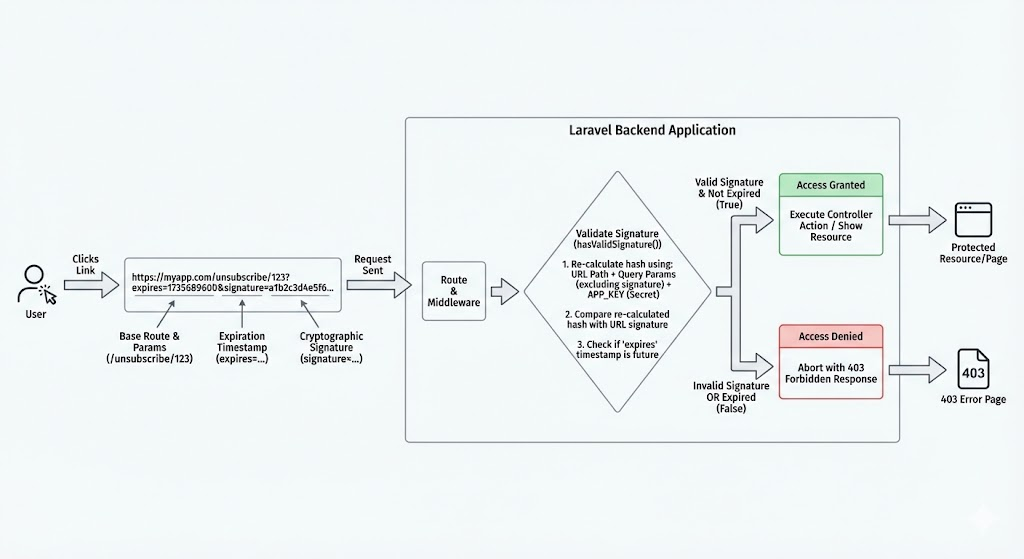
Laravel generates signed URLs using its built-in URL generator, which creates a hash based on:
- The full URL path
- All query parameters
- The application’s secret key (
APP_KEY)
When a request hits a signed route, Laravel recalculates the signature using the same inputs and compares it with the signature embedded in the URL. If the values match, the request is considered valid. If any part of the URL has been modified—such as changing an ID or adding a parameter—the validation fails automatically.
For temporary signed URLs, Laravel also checks the expiration timestamp, ensuring the link cannot be used after the defined time window.
Difference Between Normal URLs and Signed URLs
The key difference between normal URLs and signed URLs lies in trust and verification:
- Normal URLs can be freely modified by users. Any query parameter can be changed, making them unsuitable for sensitive actions without additional checks.
- Signed URLs in Laravel are tamper-proof. Even a minor modification invalidates the signature and blocks access.
Normal URLs are ideal for public navigation, while signed URLs are designed for secure, controlled access to specific actions such as verification, confirmation, or private downloads.
Role of Cryptographic Signatures
The cryptographic signature is the foundation of security in a signed URL. It acts as a digital seal that guarantees two things:
- The URL was generated by your application
- The URL has not been altered since creation
Because the signature depends on Laravel’s secret application key, it cannot be forged externally. This makes signed URLs a reliable security mechanism that works without database lookups or stored authentication tokens, while still providing strong protection against URL manipulation.
3. How Signed URLs Work Internally
Understanding how a signed URL Laravel works internally helps developers use it correctly and avoid common security mistakes. Laravel’s implementation is intentionally simple, efficient, and deeply integrated into the framework’s core.
URL Signing Mechanism in Laravel
When your application generates a signed URL, Laravel takes the complete route URL—including its path and query parameters—and creates a unique signature for it. This signature is then appended to the URL as a special query parameter.
Internally, Laravel uses its URL generator to ensure that:
- The route name is resolved correctly
- All parameters are normalized
- The URL structure remains consistent
This guarantees that the same inputs always produce the same signature. As a result, any signed URL generated by the application can later be verified with certainty.
Hashing and Signature Validation Process
At the heart of a signed URL Laravel is a hashing process. Laravel generates a hash using a keyed hashing algorithm that combines:
- The full URL (excluding the signature itself)
- All query parameters
- The application’s secret key
When a request is received, Laravel recomputes the hash using the incoming request data and compares it with the signature embedded in the URL. If both hashes match, the request is considered authentic. If they differ—even slightly—the request is rejected immediately.
For temporary signed URLs, Laravel also validates the expiration timestamp, ensuring the link is unusable after its allowed time window.
How Request Tampering Is Prevented
Request tampering is prevented because the signature is directly tied to the exact structure of the URL. Any attempt to modify:
- Route parameters
- Query values
- Order or presence of parameters
will change the computed hash. Since the attacker does not have access to the application’s secret key, generating a valid replacement signature is impossible.
This makes a signed URL Laravel inherently tamper-resistant, even though all parameters remain visible in the browser.
Importance of the APP_KEY
The APP_KEY is the backbone of Laravel’s URL signing system. It acts as the secret ingredient used in every cryptographic signature generated by the framework.
If the APP_KEY is:
- Secure and unchanged → signed URLs remain trustworthy
- Leaked → signed URLs can be forged
- Regenerated in production → all existing signed URLs become invalid
Because of this, protecting the APP_KEY is critical for maintaining the security of every signed URL Laravel. It should never be exposed publicly, committed to version control, or changed casually in a live environment.
4. Types of Signed URLs in Laravel
Laravel provides two main variations of signed URLs, each designed for different security and access-control scenarios. Choosing the right type of signed URL Laravel depends on how long the link should remain valid and how sensitive the action is.
Permanent Signed URLs
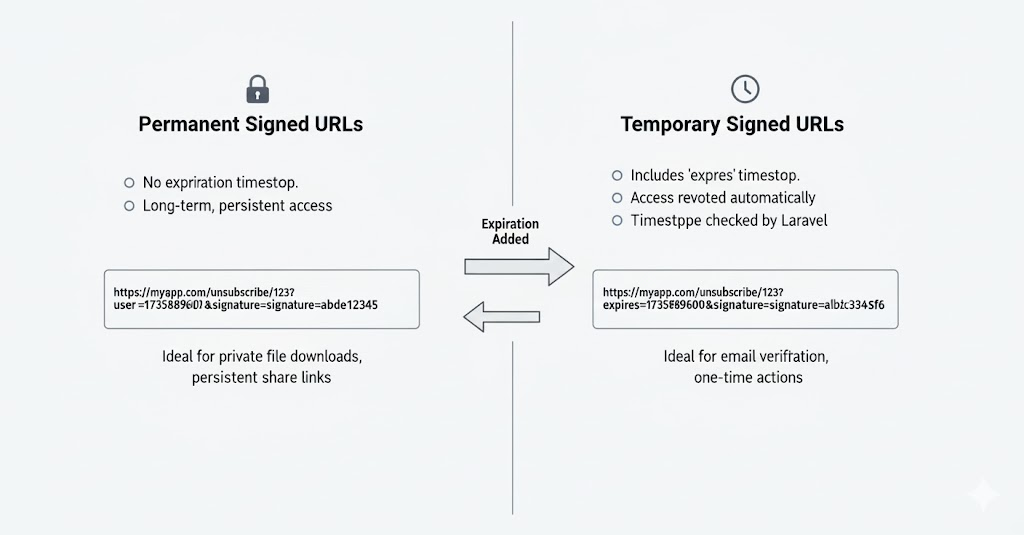
A permanent signed URL Laravel is generated without an expiration time. As long as the URL remains unchanged and the application’s APP_KEY stays the same, the signature will continue to validate successfully.
Key characteristics:
- No time-based expiration
- Signature remains valid indefinitely
- Access is revoked only if the URL changes or the
APP_KEYis rotated
Common use cases:
- Internal system links
- Long-term verification endpoints
- Secure callbacks where time restriction is unnecessary
Permanent signed URLs are best used when the link must remain valid for an extended period and the risk level is relatively low.
Temporary Signed URLs (Time-Limited)
A temporary signed URL Laravel includes an expiration timestamp as part of the signature. Once the specified time has passed, Laravel automatically rejects the request—even if the URL has not been modified.
Key characteristics:
- Automatically expires after a defined duration
- Provides an extra layer of security
- Ideal for user-facing and sensitive operations
Common use cases:
- Email verification links
- Password reset or magic login URLs
- Temporary file downloads
- One-time confirmation actions
Because the expiration time is also signed, it cannot be extended or manipulated by the user.
Differences and Use Cases
The primary difference between permanent and temporary signed URLs lies in time-based access control:
- Permanent signed URLs focus on authenticity and integrity.
- Temporary signed URLs add controlled lifespan and reduced attack surface.
In most public-facing features, a temporary signed URL in Laravel is the safer default. Permanent signed URLs should be reserved for controlled environments or trusted integrations.
When to Choose Each Type
Choose a permanent signed URL when:
- The link must work long-term
- The risk of misuse is minimal
- You control who receives the URL
Choose a temporary signed URL Laravel when:
- The action is sensitive or user-triggered
- The link is sent via email or external channels
- You want automatic security without extra cleanup logic
5. Creating Signed URLs in Laravel
Creating a signed URL in Laravel is straightforward because the framework provides built-in helpers that handle signing, hashing, and validation automatically. This allows developers to focus on application logic instead of reinventing security mechanisms.
Generating a Basic Signed URL
To generate a basic signed URL, Laravel uses its URL generator to attach a cryptographic signature to a named route. This signature ensures the URL cannot be modified without invalidating it.
In this case, the signed URL remains valid indefinitely unless:
- The URL structure changes
- The application’s secret key changes
A basic signed URL in Laravel is commonly used when you need secure access but do not require time-based expiration.
Creating Temporary Signed URLs
For most user-facing features, a temporary signed URL in Laravel is the recommended option. These URLs include an expiration timestamp, after which Laravel will automatically reject the request.
Temporary signed URLs are especially useful because:
- They expire automatically
- They reduce security risks if links are leaked
- No cleanup or manual revocation is required
Because the expiration timestamp is part of the signature, users cannot extend the validity period by modifying the URL.
Passing Parameters Securely
One of the strengths of a signed URL in Laravel is the ability to pass route parameters securely. Route parameters and query values are included in the signature calculation, meaning any attempt to modify them will invalidate the URL.
This allows you to safely pass identifiers such as:
- User IDs
- Order references
- Resource identifiers
While parameters remain visible in the URL, their integrity is fully protected. However, sensitive data should still be avoided, as signed URLs guarantee authenticity, not confidentiality.
Signed URLs for Routes with Model Binding
Signed URLs work seamlessly with Laravel’s route model binding. When a model identifier is included in a signed URL, Laravel validates the signature first and then resolves the model automatically.
This combination provides:
- Clean and readable routes
- Secure parameter validation
- Reduced controller logic
Using model binding with a signed URL in Laravel is particularly effective for actions like verification, approvals, and controlled resource access, where both security and developer productivity matter.
6. Validating Signed URLs
Validation is a critical part of using a signed URL in Laravel. While generating a signed URL ensures integrity, proper validation guarantees that only authentic and unmodified requests are allowed to reach your application logic. Laravel offers both automatic and manual validation options to fit different use cases.
Automatic Validation via Middleware
Laravel provides built-in middleware to automatically validate signed URLs. When this middleware is applied to a route, Laravel checks the signature before the request reaches the controller.
With middleware-based validation:
- URL integrity is verified automatically
- Expired temporary signed URLs are rejected
- No additional controller logic is required
If the signature is invalid or the URL has expired, Laravel immediately blocks the request. This makes middleware the most secure and recommended approach for validating a signed URL in Laravel.
Manual Validation Using Request Helpers
In some scenarios, developers may need more control over how signed URLs are validated. Laravel allows manual validation through request helper methods.
Manual validation is useful when:
- Validation logic needs to be conditional
- Multiple checks are performed in a single endpoint
- Custom responses are required
By manually validating a signed URL in Laravel, you can decide exactly how your application should react to invalid or expired signatures.
Handling Invalid or Expired Signed URLs
When a signed URL fails validation, it usually falls into one of two categories:
- The URL has been modified (invalid signature)
- The URL has exceeded its expiration time
Laravel treats both cases as unauthorized access. Proper handling is important to avoid confusing users or exposing internal details. Common strategies include:
- Redirecting users to a safe page
- Showing a clear but non-technical error message
- Logging the event for security monitoring
Handling failures gracefully improves both security and user experience.
Custom Error Handling Strategies
For advanced applications, you may want to customize how invalid signed URLs are handled. This can include:
- Custom error pages for expired links
- Different responses for invalid vs expired URLs
- API-friendly JSON error responses
- Alerting or logging suspicious access attempts
Implementing custom handling around a signed URL Laravel allows you to balance strict security with a smooth user experience, especially in public-facing features like email verification or temporary access links.
7. Common Use Cases of Signed URLs
A signed URL Laravel is widely used in real-world applications where security, simplicity, and stateless access are required. Because signed URLs verify authenticity without relying on sessions or tokens stored in a database, they are ideal for many common backend and user-facing workflows.
Email Verification Links
One of the most common uses of a signed URL Laravel is email verification. After registration, users receive a verification link that contains a secure signature and, in most cases, an expiration time.
This approach ensures:
- The verification link cannot be altered
- The request genuinely originated from your application
- The link expires automatically if unused
Laravel’s built-in verification system relies on signed URLs to provide a secure and seamless user experience.
Password Reset and Magic Login Links
Signed URLs are also frequently used for password reset and magic login features. Instead of forcing users to remember passwords or manage sessions, a temporary signed URL Laravel allows secure, one-click access.
These links:
- Expire after a short time window
- Prevent tampering or replay attacks
- Reduce reliance on persistent tokens
This makes signed URLs an excellent choice for authentication-related flows where convenience and security must coexist.
Secure File Downloads
When serving private or paid content, exposing direct file URLs can be risky. A signed URL Laravel enables secure file downloads by granting temporary or controlled access to protected resources.
Common scenarios include:
- Downloading invoices or reports
- Accessing user-specific files
- Delivering premium or licensed content
Once the signed URL expires or is altered, access is automatically denied—without additional database checks.
Private API Access
In certain situations, APIs need to be accessible only through verified links rather than full authentication systems. Signed URLs in Laravel provide a lightweight solution for private or internal API endpoints.
This is particularly useful for:
- Webhooks
- Internal service communication
- Limited-scope API actions
Signed URLs help protect API routes from unauthorized access while keeping implementation simple.
One-Time Action Confirmation (Delete, Approve, Verify)
Signed URLs are ideal for one-time or sensitive actions that should not require a full login flow. Examples include:
- Confirming account deletion
- Approving requests
- Verifying critical changes
By using a temporary signed URL Laravel, you ensure that:
- The action link cannot be reused indefinitely
- Parameters cannot be modified
- Only authorized requests succeed
8. Benefits of Using Signed URLs
Using a signed URL Laravel provides multiple advantages that make it a preferred solution for securing links and actions without adding unnecessary complexity. These benefits are especially valuable in modern, scalable web applications where performance, security, and developer efficiency matter.
Enhanced Security Without Authentication
One of the biggest advantages of a signed URL Laravel is that it provides strong security without requiring user authentication. Users can safely access a specific action or resource through a verified link, even if they are not logged in.
This is particularly useful for:
- Email-based workflows
- One-click confirmations
- Temporary access scenarios
Security is enforced through signature validation rather than session checks.
Protection Against URL Tampering
Signed URLs are inherently tamper-proof. Every parameter in a signed URL Laravel is included in the cryptographic signature, meaning any modification—no matter how small—invalidates the URL.
This prevents:
- Parameter manipulation
- ID spoofing
- Unauthorized access via URL changes
As a result, signed URLs significantly reduce common attack vectors related to query string abuse.
Time-Based Access Control
With temporary signed URLs, Laravel offers built-in time-based access control. Each signed URL can automatically expire after a defined duration, eliminating the need for manual revocation logic.
Time-based control is ideal for:
- Password resets
- Verification links
- Limited-time downloads
This makes a signed URL Laravel both secure and self-managing.
Reduced Need for Sessions or Tokens
Traditional approaches often rely on sessions, stored tokens, or database lookups. A signed URL Laravel removes much of this overhead by validating requests statelessly.
Benefits include:
- Fewer database queries
- Simpler infrastructure
- Better performance at scale
This stateless nature is especially valuable for APIs and distributed systems.
Simple Implementation with Built-In Laravel Support
Laravel provides first-class support for generating and validating signed URLs. Developers do not need third-party packages or custom cryptographic logic.
With built-in helpers and middleware, implementing a signed URL Laravel is:
- Fast
- Reliable
- Consistent with framework best practices
This allows teams to maintain high security standards while keeping the codebase clean and maintainable.
9. Performance and Scalability Considerations
While a signed URL Laravel is primarily a security feature, it is also designed to be lightweight and scalable. Understanding its performance impact helps developers confidently use signed URLs in high-traffic and production-grade systems.
Impact on Request Lifecycle
Validating a signed URL Laravel happens very early in the request lifecycle. When middleware is used, signature verification occurs before the controller logic is executed.
This early validation:
- Prevents unnecessary controller execution
- Stops invalid requests quickly
- Reduces wasted application resources
Because the verification is simple and deterministic, it adds minimal overhead to each request.
Signature Verification Cost
Signature verification for a signed URL Laravel is computationally inexpensive. It involves:
- Reconstructing the URL
- Recomputing a cryptographic hash
- Comparing the generated signature
No database queries or external services are involved. As a result, the cost per request is negligible compared to session checks, token lookups, or OAuth validation.
Using Signed URL Laravel in High-Traffic Systems
Signed URLs are well-suited for high-traffic applications. Since a signed URL Laravel is stateless, it scales naturally across:
- Load-balanced servers
- Multiple application instances
- Serverless or containerized environments
Because validation relies only on the application key and request data, no shared storage or synchronization is required.
Caching Considerations
Caching works well with signed URLs, but it must be applied thoughtfully. Since each signed URL may contain unique signatures or expiration timestamps:
- Cached responses should respect expiration times
- Long-lived caches are better suited for permanent signed URLs
- Temporary signed URLs should use short cache lifetimes
When used correctly, caching combined with a signed URL Laravel can significantly improve performance without compromising security.
10. Security Best Practices
Although a signed URL Laravel provides strong built-in protection, following security best practices is essential to ensure these links remain safe in real-world applications. Proper configuration and disciplined usage significantly reduce the risk of misuse or exposure.
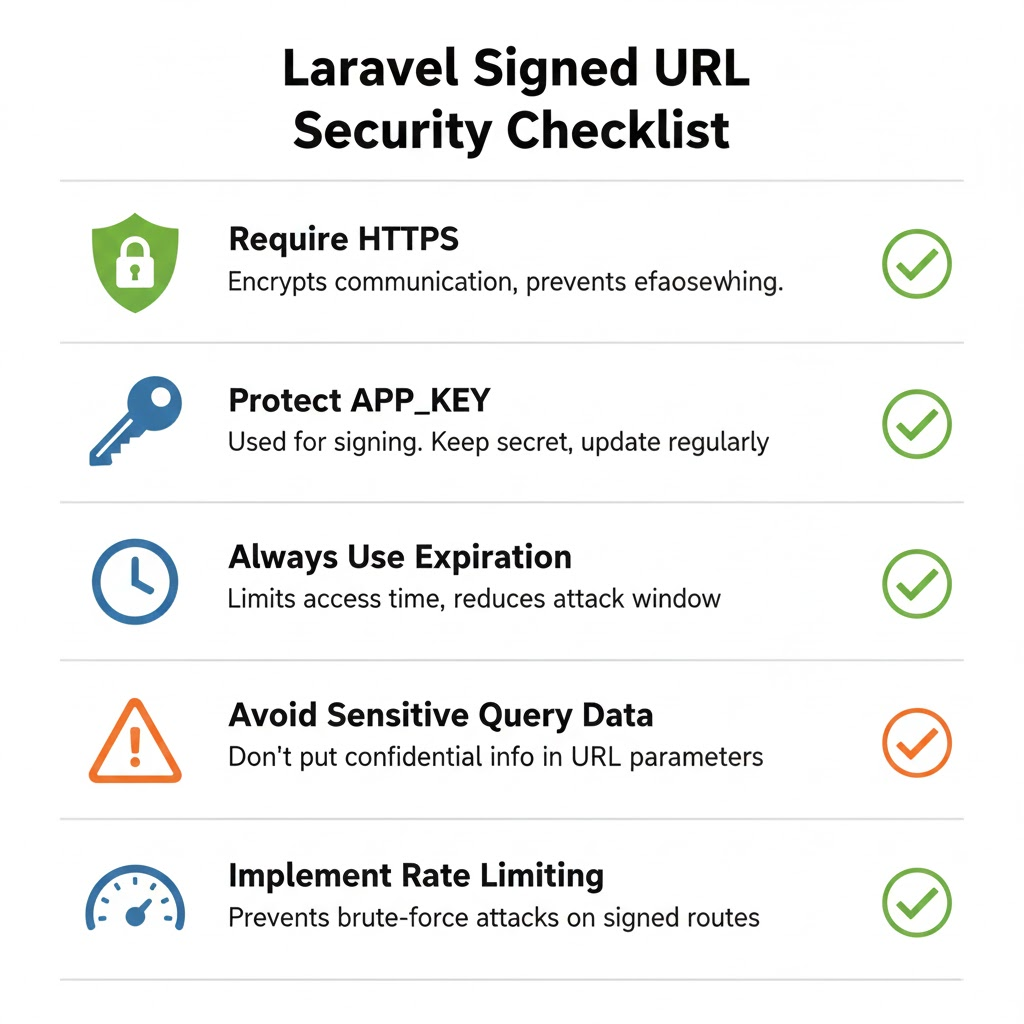
Keep APP_KEY Secure
The APP_KEY is the foundation of every signed URL Laravel. It is used to generate and validate cryptographic signatures, meaning its secrecy directly affects application security.
Best practices include:
- Never committing the
APP_KEYto version control - Storing it securely in environment variables
- Avoiding unnecessary key regeneration in production
If the APP_KEY is compromised, all signed URLs can potentially be forged.
Always Use HTTPS
Signed URLs guarantee integrity, not confidentiality. This means the URL contents—including parameters—are visible during transmission. Always using HTTPS ensures that a signed URL Laravel cannot be intercepted or modified in transit.
HTTPS protects against:
- Man-in-the-middle attacks
- URL leakage over unsecured networks
- Exposure of query parameters
For any production environment, HTTPS should be non-negotiable.
Use Expiration Wherever Possible
Whenever a signed URL is exposed externally, adding an expiration time is strongly recommended. A temporary signed URL Laravel automatically becomes invalid after the specified time window, limiting the risk of abuse.
Expiration is especially important for:
- Email-based links
- Authentication-related actions
- File downloads
Short-lived links reduce the impact of accidental sharing or leaks.
Avoid Exposing Sensitive Data in Query Strings
Even though parameters in a signed URL Laravel are protected against tampering, they are still visible to the user. Sensitive information such as passwords, personal data, or secrets should never be included in query strings.
Instead:
- Use identifiers or references
- Fetch sensitive data server-side
- Combine signed URLs with backend authorization checks
This ensures confidentiality is preserved alongside integrity.
Combine Signed URLs with Rate Limiting
For public-facing routes, adding rate limiting provides an extra layer of protection. While a signed URL Laravel prevents unauthorized access, rate limiting helps mitigate brute-force attempts or abuse.
Combining both techniques:
- Protects application resources
- Reduces attack surface
- Improves overall system resilience
This is particularly important for verification, download, or API endpoints.
11. When NOT to Use Signed URLs
While a signed URL Laravel is a powerful and convenient security mechanism, it is not the right solution for every scenario. Understanding its limitations helps you choose the most appropriate approach and avoid misusing signed URLs where stronger or different security models are required.
Public Resources
Signed URLs are unnecessary for public resources that do not require protection. Using a signed URL Laravel for publicly accessible pages, images, or assets adds overhead without providing real security benefits.
In these cases:
- Standard URLs are sufficient
- Caching becomes simpler
- URL sharing is unrestricted
Signed URLs should be reserved for controlled access, not general navigation.
Long-Term Authentication
A signed URL Laravel is not designed to replace full authentication systems. It is best suited for short-lived or action-specific access, not long-term user identity verification.
For persistent authentication:
- Session-based login systems
- Remember-me tokens
- Token-based authentication mechanisms
are far more appropriate and secure.
Highly Sensitive Data Access
Although signed URLs protect against tampering, they do not encrypt data. Any parameters included in a signed URL Laravel are visible in the browser and server logs.
For accessing highly sensitive data:
- Avoid relying solely on signed URLs
- Use authenticated requests
- Add authorization checks and encryption
Signed URLs ensure integrity, not confidentiality.
When Token-Based Authentication Is More Appropriate
In API-heavy applications, token-based authentication often provides better control and revocation capabilities. While a signed URL Laravel works well for limited API access, tokens are more suitable when:
- Access needs to be revocable at any time
- Permissions vary dynamically
- Long-lived access is required
Tokens allow granular control that signed URLs cannot easily provide.
Scenarios Where Sessions or OAuth Are Better Choices
For applications requiring:
- User identity persistence
- Role-based access control
- Third-party integrations
sessions or OAuth-based authentication models are a better fit. A signed URL Laravel excels at validating a single action, but it should not be used as a substitute for full authentication and authorization systems.
12. Signed URLs vs Other Security Approaches
A signed URL Laravel is one of several security mechanisms available to developers. Each approach has its strengths and limitations, and understanding the differences helps you choose the right tool for the right job.
Signed URLs vs JWT Tokens
Signed URLs and JWT tokens both rely on cryptographic signatures, but they solve different problems.
Signed URLs in Laravel:
- Validate a specific URL and action
- Are usually short-lived or single-purpose
- Do not require token storage or decoding
JWT tokens:
- Represent user identity and permissions
- Are suitable for long-lived authentication
- Require careful handling, storage, and rotation
Use signed URLs for action-specific access. Use JWTs for persistent, identity-based authentication.
Signed URLs vs API Keys
API keys are commonly used to authenticate applications rather than users. While they are simple, they are often long-lived and difficult to rotate safely.
A signed UR Laravel:
- Expires automatically (when temporary)
- Is bound to a specific route and parameters
- Cannot be reused for other actions
API keys, on the other hand:
- Grant broad access
- Are risky if leaked
- Require manual revocation
For limited and controlled access, signed URLs offer finer-grained security.
Signed URLs vs Session Authentication
Session authentication is ideal for browser-based applications where users log in and maintain a session state.
Compared to session authentication, a signed URL Laravel:
- Works without cookies or sessions
- Is stateless and scalable
- Is ideal for email and external access
Sessions are better when:
- Continuous user interaction is required
- Role-based permissions apply
- Identity persistence matters
Signed URLs are best for single actions, not ongoing access.
Pros and Cons Comparison
Advantages of Signed URLs in Laravel:
- Stateless and scalable
- Easy to implement
- Strong protection against URL tampering
- Built-in framework support
Limitations:
- Not suitable for long-term authentication
- Parameters are visible in URLs
- Limited revocation control
Choosing between a signed URL Laravel and other security approaches depends on the use case, risk level, and access duration.
13. Common Mistakes Developers Make
Even though a signed URL Laravel is easy to use, developers can unintentionally weaken its security by making common mistakes. Being aware of these pitfalls helps ensure signed URLs are implemented correctly and safely in production environments.
Forgetting Expiration on Sensitive Actions
One of the most frequent mistakes is generating a signed URL Laravel without an expiration time for sensitive actions. Permanent signed URLs can remain valid indefinitely, which increases the risk if the link is leaked or shared unintentionally.
Sensitive actions such as:
- Password resets
- Account verification
- File downloads
should almost always use temporary signed URLs with a short lifespan.
Using Signed URLs Without HTTPS
Signed URLs protect against tampering but do not encrypt data. Using a signed URL Laravel over HTTP exposes the entire URL—including parameters—to interception.
Without HTTPS:
- URLs can be captured on public networks
- Sensitive actions can be replayed
- Security guarantees are weakened
Always enforce HTTPS when serving signed URLs in production.
Regenerating APP_KEY in Production
The APP_KEY is essential for validating every signed URL Laravel. Regenerating it in a live environment instantly invalidates all existing signed URLs.
This mistake often happens during:
- Environment misconfiguration
- Deployment automation errors
- Improper key rotation practices
If key rotation is required, it should be planned carefully with fallback mechanisms in place.
Passing Confidential Data in Query Parameters
Although parameters in a signed URL Laravel cannot be modified, they are still visible in the browser, logs, and analytics tools. Passing confidential data such as passwords, secrets, or personal information in query strings is a serious security risk.
Instead:
- Use opaque identifiers
- Fetch sensitive data server-side
- Combine signed URLs with authorization checks
Signed URLs ensure integrity, not confidentiality.
14. Advanced Use Cases
Beyond basic implementations, a signed URL Laravel can be adapted for more advanced and complex application architectures. When used thoughtfully, signed URLs provide a flexible security layer that integrates well with background processing, multi-tenant systems, and API-driven workflows.
Custom Signed URL Logic
In advanced scenarios, developers may need to customize how signed URLs are generated or validated. A signed URL Laravel can be extended by:
- Adding custom parameters that represent business rules
- Controlling how long a URL remains valid based on context
- Applying additional authorization checks after signature validation
This allows signed URLs to act as an initial gatekeeper, while deeper business logic enforces domain-specific rules.
Signed URLs with Queues and Jobs
Signed URLs integrate naturally with queued jobs and background processing. For example, a job may generate a signed URL Laravel and send it via email or notification once processing is complete.
Common use cases include:
- Asynchronous file generation and downloads
- Delayed approval or confirmation workflows
- Scheduled reports or exports
By combining queues with signed URLs, applications remain responsive while maintaining secure, time-limited access.
Multi-Tenant Applications
In multi-tenant systems, a signed URL Laravel can be used to safely scope access to a specific tenant. Tenant identifiers included in the signed URL are protected from tampering, ensuring users cannot access resources belonging to other tenants.
This approach:
- Prevents cross-tenant data leakage
- Reduces reliance on session-based tenant resolution
- Works well with stateless architectures
Signed URLs provide an additional security boundary in tenant-aware applications.
Signed URLs in APIs and Webhooks
Signed URLs are particularly effective in API and webhook scenarios where traditional authentication may be unnecessary or impractical. A signed URL Laravel can validate incoming requests without requiring API keys or OAuth tokens.
Typical use cases include:
- Webhook endpoints from third-party services
- Internal service-to-service communication
- Limited-scope API operations
Because signature validation is stateless and fast, signed URLs fit well into event-driven and microservice architectures.
Next, we can continue with testing signed URLs, followed by frequently asked questions and the final conclusion, to complete the article with production-ready depth and strong SEO value.
Great, here’s the next section written in the same technical tone and SEO-aware style, while keeping the “signedurl laravel” keyword usage controlled and natural.
14. Advanced Use Cases
As applications grow in complexity, a signed URL Laravel can be used far beyond simple verification links. Laravel’s signing mechanism is flexible enough to support advanced architectures while maintaining security and performance.
Custom Signed URL Logic
In real-world systems, default signed URL behavior is sometimes not enough. Developers often implement custom logic around a signed URL Laravel to enforce additional business rules.
Common patterns include:
- Adding contextual parameters (tenant ID, role, action type)
- Applying conditional expiration times
- Performing extra authorization checks after signature validation
In these cases, the signed URL acts as the first layer of trust, while application logic enforces deeper access control.
Signed URLs with Queues and Jobs
Signed URLs work exceptionally well with background jobs and queues. A queued job can generate a signed URL Laravel after completing a long-running task and then deliver it to the user asynchronously.
Typical examples:
- Exporting reports or large datasets
- Generating downloadable invoices or media files
- Delayed approval or verification workflows
This approach keeps the application responsive while still providing secure, time-limited access to generated resources.
Multi-Tenant Applications
In multi-tenant systems, signed URLs help ensure strict tenant isolation. A signed URL Laravel can safely include tenant identifiers or scoped resource references, preventing users from tampering with parameters to access another tenant’s data.
Benefits include:
- Tamper-proof tenant scoping
- Reduced reliance on session-based tenant resolution
- Compatibility with stateless and API-driven architectures
Signed URLs add an extra security boundary in multi-tenant environments.
Signed URLs in APIs and Webhooks
Signed URLs are especially useful in API and webhook scenarios where full authentication may be unnecessary or too heavy. A signed URL Laravel can validate incoming requests without relying on API keys, sessions, or OAuth flows.
Common use cases:
- Webhook endpoints from third-party services
- Internal service-to-service communication
- Limited-scope or single-action API endpoints
Because signature verification is fast and stateless, signed URLs fit well into high-throughput, event-driven systems.
15. Testing Signed URLs
Proper testing ensures that a signed URL Laravel behaves correctly under all conditions—valid access, expiration, and tampering attempts. Laravel’s testing tools make it straightforward to verify that signed URLs remain secure and reliable as your application evolves.
Unit Testing Signed Routes
Unit testing focuses on ensuring that routes protected by a signed URL Laravel accept only valid requests. These tests typically verify that:
- Valid signed URLs return the expected response
- Routes reject unsigned or altered URLs
- Middleware protection is applied correctly
By isolating signed routes in unit tests, you can confirm that signature validation works independently of business logic.
Feature Testing URL Expiration
Feature tests are ideal for validating time-based behavior. When working with temporary signed URLs, feature testing ensures that:
- Requests succeed before expiration
- Requests fail after the expiration time
This confirms that Laravel correctly enforces time limits on a signed URL Laravel and prevents access once the link becomes invalid.
Testing Invalid Signatures
Testing how your application handles tampered URLs is just as important as testing valid ones. A signed URL Laravel should fail immediately if:
- Query parameters are modified
- Required parameters are removed
- The signature itself is altered
These tests ensure that request tampering is consistently detected and blocked.
Mocking Time for Expiration Tests
To reliably test expiration behavior, developers often mock or freeze time. By controlling the system clock during tests, you can simulate:
- Requests just before expiration
- Requests exactly at expiration
- Requests well after expiration
Mocking time allows precise validation of how a signed URL Laravel behaves across its entire lifecycle, without waiting in real time.
16. Frequently Asked Questions (FAQ)
This section answers common questions developers have when working with a signed URL Laravel, especially regarding security, reuse, and production readiness.
Can Signed URLs Be Reused?
Yes, a signed URL Laravel can be reused as long as it remains valid. For permanent signed URLs, this means they can be accessed indefinitely unless the URL changes or the application key is rotated. Temporary signed URLs can be reused only until their expiration time.
If reuse is not desirable for a specific action, additional application logic—such as marking the action as completed—should be implemented.
What Happens If the URL Is Modified?
If any part of a signed URL Laravel is modified, the signature validation fails immediately. This includes:
- Changing route parameters
- Modifying query values
- Adding or removing parameters
Laravel detects the mismatch and rejects the request before it reaches the controller, effectively preventing URL tampering.
Are Signed URLs Safe for Production?
Yes, signed URLs are safe for production when used correctly. A signed URL Laravel provides strong protection against unauthorized access and parameter manipulation.
For production use, always:
- Use HTTPS
- Set expiration for sensitive links
- Keep the
APP_KEYsecure
Following best practices ensures signed URLs remain a reliable security mechanism in live systems.
Do Signed URLs Work with CDN or Proxies?
Signed URLs generally work well with CDNs and proxies, but caching must be handled carefully. Since a signed URL Laravel may include unique signatures or expiration timestamps:
- CDN cache lifetimes should respect expiration times
- Temporary signed URLs should use short cache durations
- Permanent signed URLs can be cached more aggressively
When configured correctly, signed URLs integrate smoothly with caching layers and reverse proxies.
17. Conclusion
Summary of Key Takeaways
A signed URL Laravel provides a secure, lightweight, and stateless way to protect specific routes and actions. Throughout this guide, we explored how signed URLs work internally, their benefits, common use cases, limitations, and best practices. Laravel’s built-in support makes it easy to generate, validate, and manage signed URLs without relying on sessions, tokens, or complex authentication systems.
When Signed URLs Are the Right Solution
Signed URLs are the right choice when you need to:
- Secure a single action or resource
- Grant temporary or controlled access
- Avoid full authentication flows
- Protect against URL tampering
- Build scalable, stateless systems
In these scenarios, a signed URL Laravel offers the perfect balance between security, simplicity, and performance.
Final Recommendations for Laravel Developers
For Laravel developers, signed URLs should be treated as a specialized security tool, not a general-purpose authentication mechanism. Always:
- Prefer temporary signed URLs for user-facing features
- Enforce HTTPS and protect your
APP_KEY - Avoid placing sensitive data in URLs
- Combine signed URLs with authorization and rate limiting where needed
When used correctly, a signed URL Laravel can significantly improve both security and developer productivity, making it an essential feature in modern Laravel applications.
